Quick Summary
A library discovery platform is a single search tool that looks across a library’s catalogue, databases and digital resources at once, returning one combined results list. Patrons start with a topic rather than a database name, so one search box across many sources meets them where they are.
- Test unified results with a common topic and check for duplicate titles and mismatched formats.
- Ask vendors how they normalise metadata from multiple sources, since ranking depends on it.
- Map ILS, authentication, link resolver and repository connections before comparing features.
- Ask which subscribed databases are indexed in full, at article level, or not at all.
- Test mobile discovery with five to eight patrons on their own phones, including account actions.
Table of Contents
- Library Discovery Platform Features That Matter Most
- What a Library Discovery Platform Does for Patrons
- Single-Search Interfaces and Unified Result Sets
- Library Discovery System Features That Improve Relevance
- How a Library Discovery Layer Connects Your Collections
- Feature Comparison: Leading Discovery Platforms
- Library Search and Discovery Tools for Mobile Apps
- Choosing the Right Platform for Your Library Next Step
- Frequently Asked Questions
Library Discovery Platform Features That Matter Most
Last Updated: November 15, 2026
What a Library Discovery Platform Does for Patrons
A library discovery platform is a single search tool that looks across a library’s catalogue, databases and digital resources at once.
The practical value is simple. Patrons rarely start with a database name. They start with a topic.
Here is the core job, in plain terms: one search box, many sources, one results list. Everything else builds on that promise.
Single-Search Interfaces and Unified Result Sets
The single-search interface is where most patrons first meet a discovery platform. It is the one box on the library homepage that searches far more than the catalogue alone.
Librarians have leaned on this model for some time.
When you evaluate a platform, test the unified results. Search for a common topic and check whether books, articles and media appear together without obvious duplicates.
Library Discovery System Features That Improve Relevance
Relevance decides whether patrons trust the results. A platform that returns thousands of loosely matched records forces users to dig. A platform that ranks the right item near the top saves time and builds confidence.

Relevance ranking and metadata quality
Ranking depends heavily on metadata. Titles, subject headings, author names and abstracts give the search engine the signals it needs. Poor metadata produces poor ranking, however clever the algorithm.
Ask vendors how they handle metadata from multiple sources and how they normalise it. Ask how the platform treats records with thin or missing descriptions. These details matter more than a headline feature list.
Facets, filters and subject search
Facets let patrons narrow a broad result set by format, date, language or subject. They are the difference between a list patrons scroll through and a list they can actually work with.
Subject search deserves particular attention. Patrons often know the topic they want but not the exact title. A platform that supports well-structured subject browsing helps them discover items they would otherwise miss.
How a Library Discovery Layer Connects Your Collections
A discovery layer sits between patrons and the systems that hold library content. It pulls records from the catalogue, licensed databases and local collections, then presents them in one interface. The feature list tells you what patrons see; the integration layer tells you whether that list is accurate.
The connections that have to work
A discovery layer is only as good as the systems it can reach. Before you compare features, map the connections your library actually needs:
- The ILS or LSP for holdings, availability, loans and holds. If availability is stale, patrons lose trust in the result list quickly.
- Authentication via SAML, Shibboleth or another single sign-on method, so off-campus patrons reach licensed content without a second login.
- A link resolver to translate citations into full-text links and to route patrons to the right copy.
A common pattern is for the central index to cover the big aggregators well but thin out for niche or regional databases. Ask the vendor which of your subscribed databases are indexed in full, which are indexed only at the article level, and which are not covered at all.
Metadata configuration and normalisation
Ranking and facets depend on metadata, and metadata from many providers rarely arrives clean. Expect to spend real time on configuration:
- Mapping local catalogue fields to the discovery layer’s schema, including subject headings, format codes and location data.
- Normalising formats so that a book, an ebook and a book chapter do not appear as three unrelated formats in the facet list.
- Deduplicating records that arrive from both the catalogue and a database, and deciding which record wins.
Build that into the project plan rather than treating it as an afterthought.
Migration and implementation sequence
A discovery implementation is a project with a sequence, not a switch. A workable order looks like this:
- Inventory the systems, databases and collections that must connect, and confirm the vendor supports each one.
- Configure authentication and the link resolver first, because nothing else can be tested end to end without them.
- Load and map metadata, then run a sample of known-item and topic searches to check coverage and duplicates.
- Tune ranking and facets against those test searches, using real patron queries where you have them.
- Run a pilot with a small group of patrons and staff, including mobile and accessibility checks.
- Go live with a rollback plan, and keep the old catalogue reachable for a defined period.
Watch out: migrating without a rollback plan turns a metadata problem into a front-door outage, so agree the fallback before launch.
Ongoing administration
Integration does not end at go-live. Someone has to own the discovery layer week to week: monitoring the central index for coverage changes, updating link-resolver targets when subscriptions change, reviewing zero-result searches, and checking that new databases are indexed. Ask the vendor how configuration changes are made, whether staff can adjust ranking weights or facet order without a support ticket, and what the release cycle looks like.
Feature Comparison: Leading Discovery Platforms
The table below compares the discovery products named in our research. Pricing for these platforms varies, so request current quotes directly from each vendor.
| Platform | Vendor focus | Pricing signal | Notable features | Best for |
|---|---|---|---|---|
| SOLUS | Web discovery, mobile apps, events and bookings | Contact SOLUS for a quote | Discovery, mobile apps, events calendar, bookings | Libraries of all sizes, from single branches to consortia |
| Primo | Scholarly discovery service | Contact vendor | Access from any device | Libraries seeking scholarly discovery |
| EBSCO Discovery Service | Academic discovery | Contact vendor | AI-enhanced and natural-language search | Libraries interested in AI-assisted search |
| Vega Discover | Innovative Interfaces discovery | Contact vendor | Discovery product within a wider systems suite | Libraries evaluating Innovative Interfaces products |
| ODA | Print and digital discovery | Not stated | Covers print and digital resources | Libraries wanting one view of both |
Pros and cons at a glance:
- SOLUS: Features built for libraries of all sizes, with web discovery, mobile apps and events and bookings. Pricing depends on quantity, dates and delivery, so ask for a quote.
Library Search and Discovery Tools for Mobile Apps
Most discovery traffic now arrives on a phone, often on a campus network or a mobile connection that drops in and out. A platform that works on a desktop but hides facets behind a hamburger menu, or loses a patron’s place when they rotate the screen, will lose that patron at the first refinement. Mobile is not a smaller version of the desktop experience; it is a different set of constraints, and it deserves its own evaluation pass.
What good mobile discovery looks like
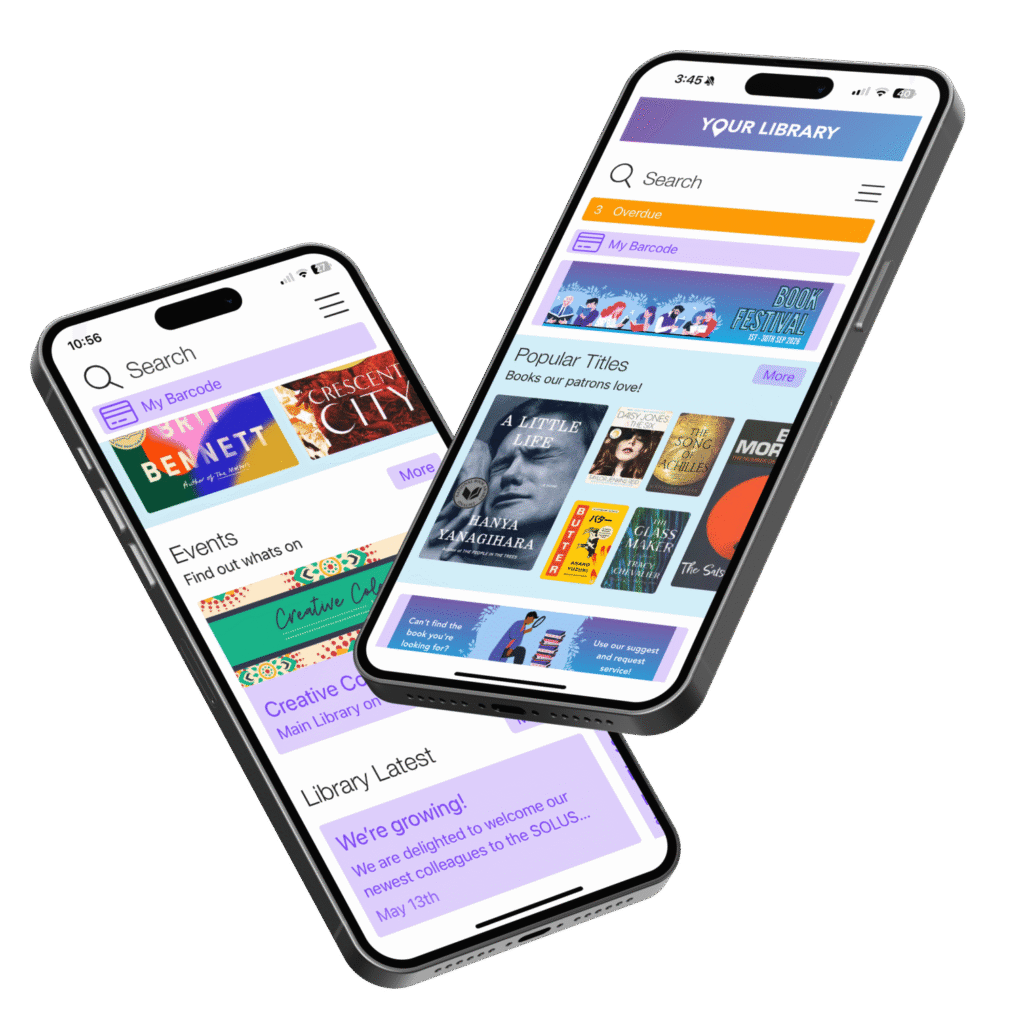
A mobile-friendly discovery layer keeps the core loop intact on a small screen: type a query, scan a short result list, apply one or two facets, open a full-text link or place a hold. The SOLUS Library App helps patrons find and borrow titles from their phone. In practice that means:
- Responsive result cards that show title, creator, format and availability without horizontal scrolling.
- Facets that collapse into a filter drawer but stay reachable after each refinement, rather than resetting to the top of the page.
- Tap targets of at least 44 by 44 pixels, so patrons are not mis-hitting adjacent links.
- Full-text and availability links that open correctly in the device’s browser or PDF viewer, including off-campus authentication via proxy or single sign-on.
A common pattern is for the mobile web experience and a native app to diverge over time. If your library offers both, test them separately rather than assuming the app inherits the web fixes.
Accessibility is part of the mobile brief
Mobile usability and accessibility overlap heavily. Screen-reader support on iOS and Android, keyboard and switch-access navigation, sufficient colour contrast, and text that respects the operating system’s font-size setting all matter more on a phone, where there is no large monitor to compensate. Test with at least one screen reader and one keyboard-only pass before you sign.
How to test mobile discovery properly
Do not rely on a vendor demo on a large tablet. Run a short, structured test:
- Recruit five to eight patrons who reflect your actual user mix, students, researchers, public-library members, and ask them to use their own phones.
- Set three real tasks: find a known book, find a recent article on a set topic, and place a hold or save an item.
- Observe where they hesitate, especially around facets, login and full-text links, and note whether they recover without help.
- Repeat on a slow connection or with the device throttled, because library Wi-Fi and mobile data are not always fast.
- Check the same tasks with a screen reader to catch accessibility failures that sighted testing misses.
Watch out: a platform that passes a desktop demo can still fail the mobile hold-and-renew flow, so test account actions as carefully as search.
Integrations that affect the mobile experience
Mobile discovery rarely stands alone. It depends on the same authentication, link resolver and ILS connections as the desktop, plus any app or discovery layer your library already runs. Map those connections before you assume a mobile app will simply plug in.
Choosing the Right Platform for Your Library Next Step
Start with your patrons, not the feature list. Write down the three searches they run most often, the devices they use and the systems you must connect.
Shortlist two or three options, request demos and run the same test searches on each. Ask every vendor for current pricing, integration details and references from libraries similar to yours in size and setup.
If you want to see how SOLUS handles discovery, mobile apps and events in practice, the Library Events and Bookings platform shows the all-in-one calendar in detail. For an overview of the full range of discovery and related tools, Essential Library Tech Tools brings the products together in one place.
Frequently Asked Questions
What are library discovery systems?
A library discovery system is a single search tool that queries a library’s catalogue, journal articles, e-books and databases at the same time. Instead of searching each resource separately, patrons see one ranked list of results with options to refine by format, date or subject. Most systems draw on a central index of metadata from the library’s collections and licensed content, so results can be linked directly to full text where the library has access. For patrons, the main benefit is fewer dead ends and less time spent working out which database holds what they need.
What is the difference between a library catalogue and a discovery platform?
A library catalogue lists the items a library physically or digitally holds, usually books, DVDs and local e-resources. A discovery platform goes further by indexing articles, databases and content from many providers and presenting everything in one search. Catalogues are mainly a record of holdings; discovery platforms are built to help users find and access material across sources. Many libraries run both, with the discovery platform sitting in front of the catalogue and linking users onward to items they can borrow or download.
What features should a library discovery platform have?
Look for a single search box that covers the whole collection, relevance ranking that you can tune, facets for refining results, and clear full-text links with access status shown. Check how the platform handles metadata from your own catalogue and third-party databases, and whether it supports advanced and subject search. Accessibility matters too: keyboard navigation, screen reader support and compliance with WCAG 2.1 Level AA should be confirmed rather than assumed. Ask vendors how they handle usage data and whether patron privacy settings can be configured.
How can a discovery platform improve library search?
A discovery platform improves search mainly by combining sources that patrons would otherwise search one at a time. It can also improve relevance when the metadata behind it is clean, which is why many libraries review catalogue records before or after go-live. Usability testing with real patrons is the most reliable way to find problems, such as confusing facet labels or results that lead to items the library does not hold. Measure the change by tracking search abandonment, failed searches and the number of patron enquiries about finding material.