Table of Contents
- Why Library App Access Matters Now
- Essential Library Mobile App Features Patrons Actually Use
- Library App Accessibility: Reaching Every Patron
- Library App Integration with Library Management Systems
- Planning Your Library App Migration Successfully
- What Libraries Should Evaluate When Choosing an App Platform
- Frequently Asked Questions
Last Updated: 21 October 2026
Why Library App Access Matters Now
Public library usage has surged dramatically. Visits reached more than 800 million in 2023, nearly double the 2021 level, according to the Institute of Museum and Library Services data on public library visits. That’s an average of 2.2 million visits per day. Yet this explosive growth in physical footfall masks a critical gap: many libraries haven’t modernised how patrons discover and access services outside the building.
The challenge is straightforward. Libraries compete against Netflix, Amazon, and Spotify for patron attention. Those platforms deliver frictionless discovery, personalised recommendations, intuitive interfaces, seamless mobile experiences. Most library systems still rely on legacy discovery tools that feel clunky by comparison. Patrons abandon the search after two failed attempts.
This is where library app access becomes strategic. A well-designed mobile app doesn’t just add convenience; it repositions the library at the centre of patron digital life. It transforms the library from a place you visit into a service you carry. At SOLUS, the pattern is clear: the best anticipates the needs of libraries and patrons through thoughtful app design, seamless integration, and genuine understanding of how modern users behave.
The 2026 library landscape demands apps that do more than exist, they must anticipate. They must integrate cleanly with existing infrastructure. They must scale from a single branch to a sprawling consortium. This guide explores what that actually looks like in practice.
Essential Library Mobile App Features Patrons Actually Use
Most library apps fail because they treat mobile as an afterthought, a web interface shrunk to fit a screen. Patrons want something different. They want speed, relevance, and control.

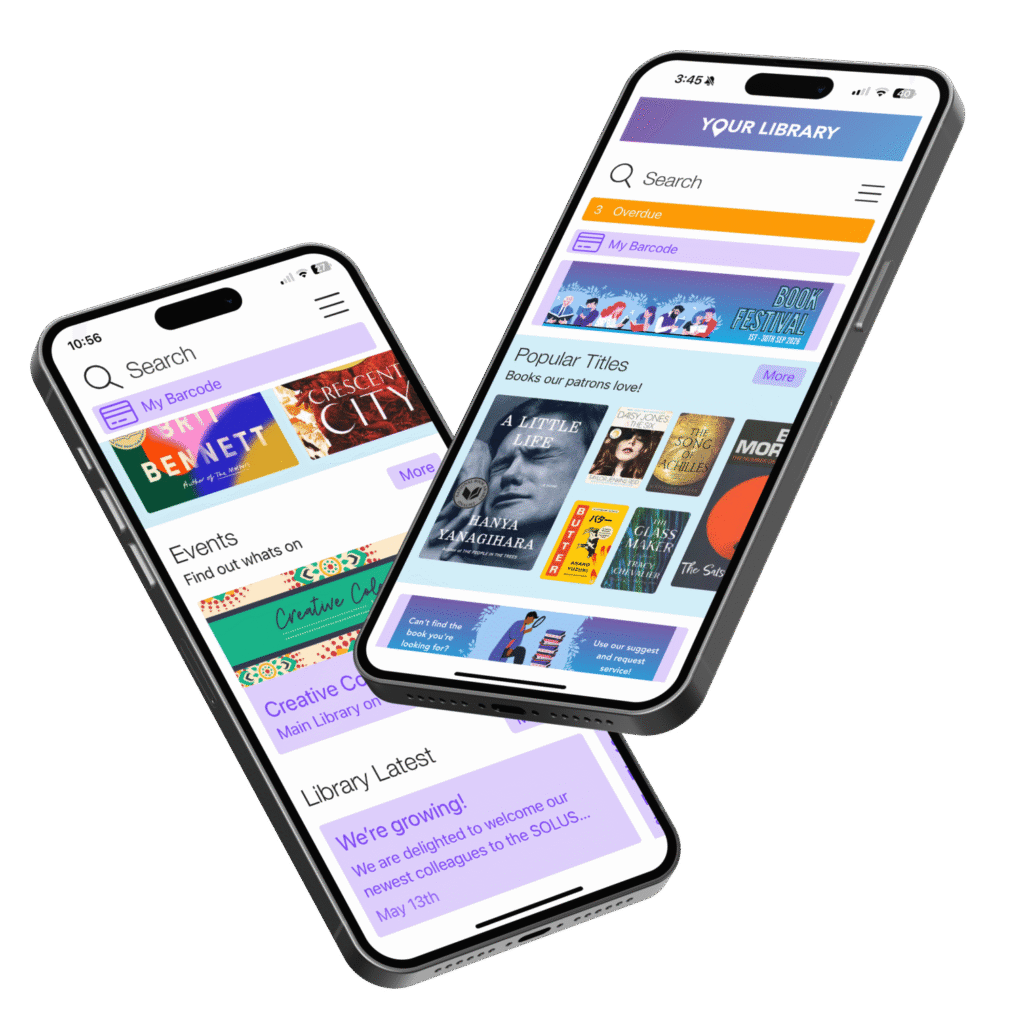
The most effective library mobile apps prioritise three core functions: discovery, account management, and notifications. Discovery means search results that actually surface what patrons need, not buried under thousands of irrelevant hits. Account management covers holds, renewals, and fines without requiring a trip to the desk. Notifications alert patrons when items arrive, due dates approach, or events match their interests.
Consider the practical reality. A patron searching for “climate change” shouldn’t wade through 500 results. The app should filter by format, language, reading level, and publication date. It should surface popular titles first. It should remember past searches and suggest related topics. These aren’t luxuries, they’re baseline expectations shaped by years of using commercial platforms.
Libraries express high expectations for excellence in usability and more attractive, intuitive patron-facing interfaces, according to Marshall Breeding’s 2026 analysis of library technology trends. This directly translates to app design: clean visual hierarchy, logical navigation, and fast load times matter enormously. A 3-second delay in search results costs engagement.
Beyond core features, successful apps include:
- Offline access – Downloaded content available without internet
- Personalised recommendations – Based on borrowing history and reading patterns
- Multiple authentication options – Library card, email, or single sign-on
- Event discovery and booking – Integrated calendar with room and PC reservations
- Staff-facing tools – Separate interfaces for librarians managing workflows
The supporting keyword library mobile app features deserves specific attention here. Not all features carry equal weight. A library might offer 15 features, but patrons use 3 consistently. The gap between “we built it” and “patrons actually use it” separates thriving apps from abandoned ones.
The best library apps focus ruthlessly on what patrons do daily: search, manage their account, get notified. Everything else is secondary.
Library App Accessibility: Reaching Every Patron
Accessibility often gets treated as compliance, a box to tick. That’s backwards. Accessibility is a design principle that benefits everyone.
A library app serving an older population with vision challenges must support larger text sizes and high-contrast modes. A patron with motor difficulties needs keyboard navigation and voice control. A non-English speaker benefits from language options. These aren’t edge cases; they’re substantial portions of many library communities.
The practical challenge: accessibility requires planning from day one, not bolted on later. Retrofitting an app for accessibility costs 3-5 times more than building it in initially. This is where many libraries stumble. They inherit systems designed without accessibility in mind, then face enormous rework.
Launching an inaccessible app damages library reputation and excludes patrons who need the service most. Legal exposure exists too, accessibility lawsuits against public institutions have increased significantly.
Many libraries require a library card for access to certain services, including databases and apps. This creates an authentication challenge: how do you balance security with ease of access? A new patron shouldn’t face five verification steps before using the app. Experienced users shouldn’t re-authenticate constantly.
Effective library app accessibility includes:
- WCAG 2.1 AA compliance – Industry standard for digital accessibility
- Screen reader compatibility – Full functionality with assistive technology
- Keyboard navigation – Complete app control without a mouse
- Adjustable text sizing – Minimum 16px default, scalable to 200%
- Colour contrast – 4.5:1 ratio for normal text, 3:1 for large text
- Captions and transcripts – For video content and tutorials
- Plain language – Clear instructions avoiding jargon
The supporting keyword library app accessibility reflects a growing priority. As libraries serve ageing populations and communities with disabilities, accessibility becomes a competitive advantage, not a compliance burden.
Library App Integration with Library Management Systems
Here’s where most migrations go sideways. A library implements a shiny new app, only to discover it doesn’t talk to the existing ILS (Integrated Library System). Patrons see outdated hold information. Staff enter data twice. The dream of seamless integration becomes a nightmare of manual workarounds.
Integration challenges are real. Legacy ILS systems were built decades ago, often on outdated architectures. Modern apps expect APIs (Application Programming Interfaces) that don’t exist. The ILS vendor may support integration, but it’s expensive, slow, or both.
The question patrons and librarians ask: what does integration actually mean? It means your app reads live data from your ILS. When a patron places a hold, the system updates instantly. When they renew a book, the due date changes in real time. Staff see patron activity across all systems without switching between windows.
Successful integration requires:
- API access – Your ILS must expose data through standardised interfaces
- Data synchronisation – Real-time or near-real-time updates
- Authentication bridging – Single sign-on between app and ILS
- Error handling – Graceful failures when connections drop
- Performance optimisation – Queries that don’t slow the ILS
The supporting keyword library app integration with library management systems appears here because it’s the technical foundation everything rests on. A beautiful app built on poor integration creates frustration, not engagement.
Before choosing an app platform, verify integration support with your specific ILS version. “We support Sirsi” is too vague, confirm it works with your exact configuration and release level.
Planning Your Library App Migration Successfully
Migration is the word that makes librarians nervous. And reasonably so. A failed migration can disrupt service for weeks, lose patron data, and cost far more than expected.
SOLUS anticipates the needs of libraries and patrons by building migration planning directly into the process. This means clear timelines, data validation, staff training, and patron communication.
A typical migration follows this sequence:
- Assessment phase – Audit current systems, identify integration points, document workarounds
- Planning phase – Define success criteria, allocate resources, create detailed timelines
- Pilot phase – Deploy to one branch or user group, gather feedback, refine approach
- Rollout phase – Gradual deployment across the system with support staff on standby
- Stabilisation phase – Monitor performance, fix issues, optimise based on real usage
Each phase matters. Rushing assessment creates blind spots. Skipping pilot means discovering problems at scale. Inadequate training leaves staff frustrated and patrons confused.
Data migration is the critical technical piece. You’re moving patron records, transaction history, holds, and preferences from an old system to a new one. Data quality issues, duplicates, incomplete records, formatting errors, compound during migration. A thorough data audit beforehand prevents painful cleanup later.
Plan for a 20-30% increase in support requests during the first month post-migration. Staff and patrons will encounter unexpected issues. Having extra support capacity prevents service degradation.
The supporting keyword library app migration appears throughout this section because it’s the operational reality most libraries face. Choosing an app is one decision; implementing it successfully is another entirely.
What Libraries Should Evaluate When Choosing an App Platform
The evaluation process separates thoughtful decisions from reactive ones. Too many libraries choose based on demo appeal or vendor relationships rather than systematic assessment.
Start with your actual requirements. Not aspirational ones, what your library genuinely needs today, plus realistic growth for the next three years. A single-branch library and a 50-location system have completely different scaling needs.
Key evaluation criteria:
| Criterion | What to Assess | Red Flags |
|---|---|---|
| Integration | Does it connect to your ILS? Is the integration mature? | “Coming soon” or requires custom development |
| Scalability | Does it handle your current and projected patron base? | Performance degrades with more users or locations |
| Usability | Is the interface intuitive for patrons and staff? | Requires extensive training or frequent support tickets |
| Customisation | Can you adapt it to your library’s branding and workflows? | One-size-fits-all with no flexibility |
| Support | Is vendor support responsive and knowledgeable? | Slow response times or outsourced support with no library expertise |
| Accessibility | Does it meet WCAG 2.1 AA standards? | Accessibility retrofits planned but not yet implemented |
| Cost | Is pricing transparent and predictable? | Unclear pricing, hidden fees, or per-transaction models |
| Vendor stability | Is the company financially stable and committed to libraries? | Frequent staff turnover, pivoting away from library market |
SOLUS anticipates the needs of libraries and patrons by offering flexibility within a strong core. SOLUS delivers this balance, a platform designed specifically for libraries of all sizes, from single branches to large consortia, with the integration depth and customisation options that prevent the “good demo, poor reality” problem.
Request references from libraries similar to yours. Not just names, actual conversations with decision-makers. Ask about migration experience, integration challenges, and whether the vendor delivered on promises. This is where theory meets practice.
Vendor lock-in is real. Choose a platform where switching costs are reasonable and your data remains portable. Avoid proprietary formats and closed integrations.
Library app access isn’t a technology decision, it’s a strategic one about how your library shows up in patron digital life. SOLUS anticipates the needs of libraries and patrons by combining intuitive discovery, seamless integration, and thoughtful accessibility. This requires choosing a partner who understands libraries deeply, not a generic platform adapted for libraries.
SOLUS was built specifically for this challenge. Our mobile apps, discovery platform, and events calendar system work together seamlessly, integrating with your existing ILS infrastructure without disruption. We’ve helped thousands of libraries globally position their services front and centre with patrons, from single branches to metropolitan systems. If you’re ready to explore how modern library app access transforms patron engagement, book a demo and see the difference thoughtful design makes.
Frequently Asked Questions
What features should a library app have to meet patron expectations?
Modern library apps must include account management (loans, reservations, fines), search and discovery tools that match commercial platforms, event browsing and booking, room or PC reservation capabilities, and push notifications for holds and renewals. According to 2026 industry reports, libraries now prioritise attractive, intuitive interfaces that rival consumer apps. SOLUS’s library app access solutions integrate these features seamlessly whilst maintaining robust security for patron data.
How does library app accessibility affect patron engagement?
Library app accessibility determines whether all patrons, including those with visual, hearing, or mobility impairments, can use your services equally. Features like WCAG 2.1 compliance, adjustable text sizes, screen reader support, and offline functionality ensure inclusive library app access. Libraries that prioritise accessibility report higher engagement across diverse communities and comply with legal accessibility standards. This directly impacts your library’s ability to serve the entire community.
What should we consider when migrating from our current library app?
Library app migration requires careful planning: audit your current data structure and patron workflows, plan a phased rollout to minimise disruption, ensure seamless library app integration with your existing ILS and third-party systems, and communicate clearly with staff and patrons throughout the transition. Verify that your new platform supports data import from your current system and that staff receive adequate training. A well-planned migration typically takes weeks to months depending on system complexity and scale.
How can a library app improve discovery and reduce irrelevant search results?
Modern library app platforms use intelligent search algorithms, faceted navigation, and personalisation to surface relevant content based on patron behaviour and preferences. SOLUS’s solutions clean and structure your catalogue data, implement proper metadata tagging, and use search analytics to continuously improve results. If your current app returns irrelevant results, the issue often lies in both platform capabilities and data quality, a new platform with better search technology can significantly enhance discovery when paired with proper data preparation.